

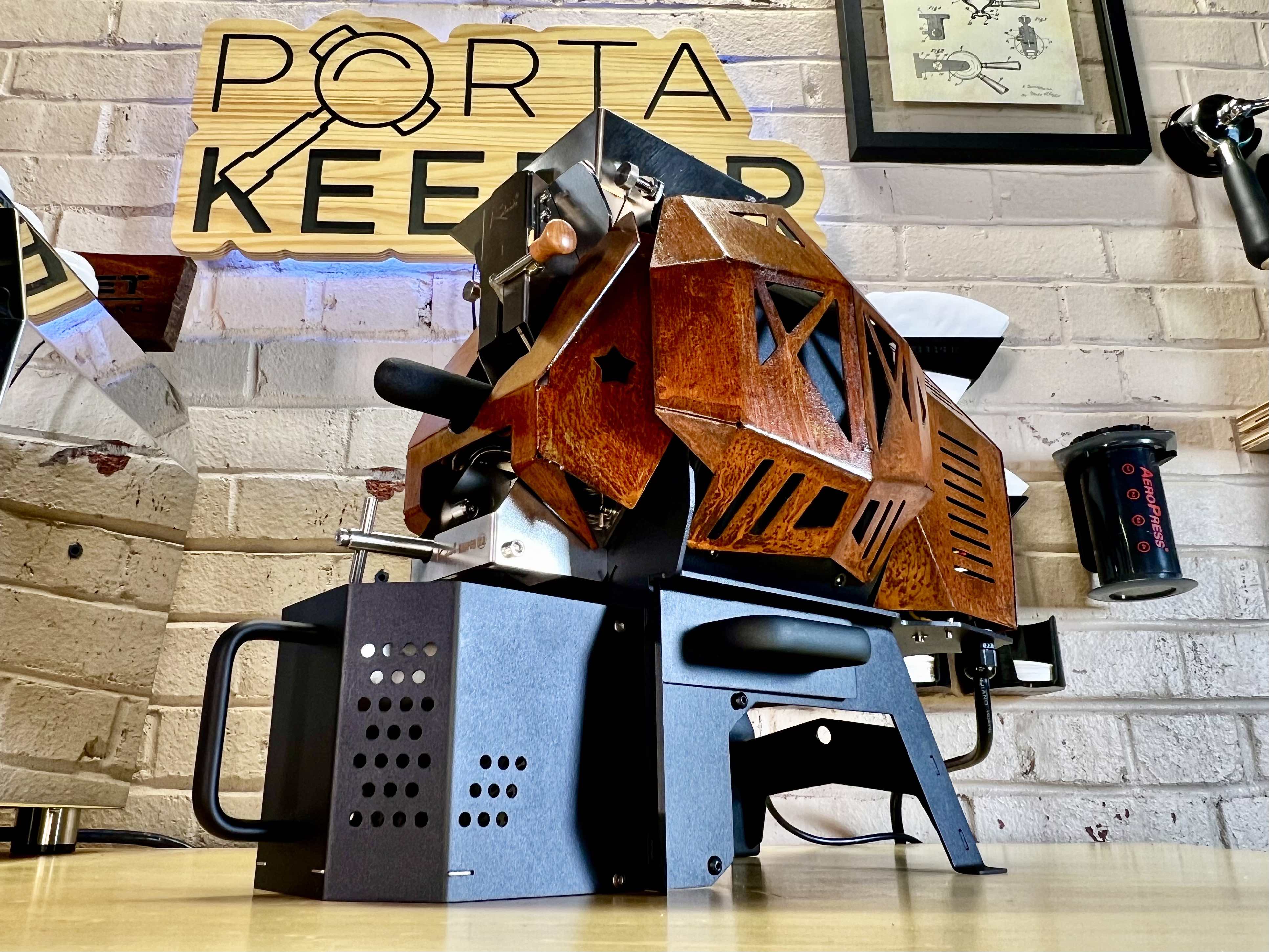
Kaleido M2 LITE 500g Coffee Roaster (Artisan System)

Kaleido M2 LITE 500g Coffee Roaster (Artisan System)

Regular price $1,299.00 Sale price$1,199.00 Save $100.00
/
Shipping calculated at checkout.

  • Free Shipping for Orders Over $100 in USA 48 States - No International Shipping
Please read red texts below. Some variations of this product are Pre-Order only.

Current order status: Current M2 Lite orders are part of the next preorder allocation, with an estimated mid-October 2026 delivery. Production and freight timing can change, so the date is an estimate rather than a guaranteed delivery date.

Version: This is the current black 120V M2 Lite configured for Artisan control.

The Kaleido M2 Lite is a 500g electric drum coffee roaster for home roasters who want more coffee per batch and direct control over the roast. Its listed 200–500g green-coffee range gives you room to develop profiles and roast for regular household use without moving to a much larger machine.

Adjust heat, airflow and drum speed in Artisan, watch bean and environmental temperatures, and save your roast logs for comparison. This black, 120V version uses 1,600W carbon-fiber infrared heating with circulating hot air.

Before ordering: You supply the computer; we recommend a Windows laptop. The M2 Lite does not support the Kaleido proprietary tablet. Plan for cooling-box assembly and suitable ventilation.

M2 Lite setup guide, Artisan connections and support — on Kaleido Roasters USA, our dedicated Kaleido brand website.

M2 Lite specifications

Feature Details
Green-coffee batch range 200–500g; finished roasted weight will be lower
Heating 1,600W carbon-fiber infrared electric heating with circulating hot air
Electrical version 120V
Drum 304 stainless steel
Roast controls Adjustable heat, fan speed and drum speed through Artisan
Temperature feedback Bean temperature (BT) and environmental temperature (ET) probes
Computer connection USB or Bluetooth; appropriate drivers and configuration required
Software Free, open-source Artisan desktop software; computer not included
Cooling and chaff Fan-assisted cooling box and separate chaff collector
Approximate dimensions 445 × 220 × 313mm (L × W × H); about 17.5 × 8.7 × 12.3 inches
Listed roaster weight 14.5kg / approximately 32lb
Finish and assembly Black; cooling box requires assembly; heating elements are pre-installed

Dimensions and weight follow the M2 Lite product specification graphic. Allow additional working space for the exhaust connection, loading beans, removing the trier, emptying the cooling box and accessing the chaff collector.

How much roasted coffee does a 500g batch produce?

A 500g rating refers to the green beans loaded into the roaster. The beans lose weight during roasting, so a full charge does not produce 500g of finished coffee.

Green coffee loaded Roasted coffee at 15% weight loss
200g 170g
300g 255g
400g 340g
500g 425g

These are calculated examples using 15% weight loss, not measured M2 Lite performance or guaranteed yields. Actual loss depends on the coffee and roast.

At that example yield, one full batch provides about 23 complete 18g doses; two full batches provide 850g of roasted coffee. If you use 500g of roasted coffee each week, you would need roughly 588g of green coffee at the same loss rate, spread across at least two batches. See our coffee roast weight-loss and yield guide to calculate your own requirements.

Should I always roast the full 500g?

No. Choose a repeatable charge within the listed range that suits your coffee and roast plan. Bean size, density and expansion affect how a batch behaves. When changing batch weight, reassess your starting conditions and heat, airflow and drum settings; a profile developed at 250g is not automatically a 500g profile. Leave time to compare the brewed results.

M2 Lite vs. the older M2

The M2 Lite is the current 500g model. Older M2 listings and manuals may describe a 400g machine, so check the model and generation when comparing specifications or downloading settings.

  • Simplified body panels: A revised exterior with no carry handle.
  • Updated airflow arrangement: Hot-air delivery enters from the side of the roasting chamber.
  • Artisan control: A computer-based workflow comparable in approach to the earlier Pro configuration.
  • Cooling-box assembly: The cooling box arrives unassembled.

The previous M2 has been discontinued. Choose support information for your actual roaster rather than assuming every older M2 accessory, setting or instruction carries over.

Choose between the M1 Lite, M2 Lite and M6 Pro

Model Maximum green charge When it makes sense
M1 Lite 200g Smaller trials and personal-use batches; listed range starts at 50g
M2 Lite 500g More weekly coffee per batch while retaining an Artisan home-roasting workflow
M6 Pro 700g Larger regular batches when the extra capacity is useful

The M2 Lite offers 2.5 times the M1 Lite's maximum green charge, but that is a capacity comparison, not a promise of 2.5 times the hourly output. Session time also includes preheating, cooling, unloading and preparation between batches. Check each larger model's space and electrical requirements before upgrading.

Roast control and logging with Artisan

Artisan combines the temperature record with your control changes so you can see what happened during a roast. BT tracks the bean-temperature probe; ET tracks the environmental probe in the roasting chamber. Save the curve and note the coffee, charge weight, first crack, drop point and finished weight.

Use heat, airflow and drum speed deliberately, then compare the cup before changing several variables at once. Repeating a curve can help you develop consistency, but different coffees and batch sizes may need different settings. The M2 Lite is suitable for developing espresso and filter-coffee profiles; it does not impose a single roast style.

Which computer and connection should I use?

We recommend a Windows laptop. Artisan also provides macOS and Linux downloads, but compatibility depends on the computer, operating system, driver and roaster configuration. A Chromebook is not a Windows laptop, and an iPad or Android tablet is not a substitute for the supported Artisan desktop setup.

Review our software and driver guidance and the current Artisan system requirements before choosing a computer. Both USB and Bluetooth are available on this M2 Lite.

Bluetooth is paired, but Artisan is not reading temperatures. What next?

Pairing adds the roaster to the computer's device list; it does not complete the Artisan setup. Check the driver, selected port and configuration against our Kaleido connection instructions. On Windows, the setup guide explains how to identify the outgoing Bluetooth COM port. Confirm live readings before starting a roast.

Prepare for your first M2 Lite roast

  1. Read the setup guide. Start with Kaleido Roasters USA's setup instructions and follow the hardware instructions for the M2 Lite.
  2. Check the packaging and chaff tray. Remove the trier, tools, fasteners and other loose items before powering the roaster. Assemble the cooling box as instructed. Heating elements arrive installed.
  3. Prepare the space. Use the specified 120V supply and allow access to the loading opening, sampler, cooling box and chaff tray. Plan exhaust capture for both roasting and cooling.
  4. Configure the computer. Install Artisan, the required driver and the correct settings. Verify readings and control operation following the guide.
  5. Prepare coffee and a scale. Follow the first-use, seasoning and preheating instructions. Record green and finished weights, supervise the roast and follow the cooling and shutdown procedure.

See the M2 Lite in use

Espresso Outlet: M2 Lite introduction and overview

See the current M2 Lite's layout and features before setting up your own roaster. Use this page for the current price and order status if the video mentions an earlier offer.

View bean loading, sampling and cooling details
Kaleido M2 Lite bean-loading opening, horizontal bean trier and front cooling box
The loading opening, removable sampler and cooling box each need accessible working space.

Ventilation and routine care

The M2 Lite is electric, but it is not smokeless. Roasting produces smoke, heat, odor and chaff, and beans continue releasing heat and odor during cooling. Chaff collection does not replace exhaust ventilation. Discuss your proposed setup with our support team before choosing ductwork or assuming a kitchen hood is adequate.

After following the cooldown procedure and disconnecting power, remove collected chaff and clean as directed. Keep the cooling box and airflow paths clear. Our Kaleido maintenance resources explain drum access and cleaning; confirm the instructions match your model before disassembly.

M2 Lite buying questions

Can I roast back-to-back batches?

Yes. You can roast successive batches without a full machine cooldown between each one. Return to suitable starting conditions for the next charge and allow time for cooling, unloading and recharging. The number of batches per hour depends on your roast and workflow.

Does automatic roasting mean I can leave it unattended?

No. Artisan's automation tools require appropriate configuration and a suitable profile. Stay with the roaster during operation and follow the hardware instructions throughout roasting and cooling.

Can I add a Kaleido tablet later?

The M2 Lite is not compatible with the Kaleido proprietary tablet. Supply a compatible computer for Artisan. If tablet control is a buying requirement, ask us about a compatible Dual model before ordering.

Is it a good upgrade from a smaller home roaster?

It can be useful if your current batch size means roasting more often than you want, or if you want integrated BT/ET logging and adjustable heat, airflow and drum speed. Plan for a computer setup and time to learn the new machine. For occasional tiny test batches, the M1 Lite may be a better fit.

Questions about batch size, your computer or the roasting space? Email kaleidoroasters@espressooutlet.com.

Use collapsible tabs for more detailed information that will help customers make a purchasing decision.

Ex: Shipping and return policies, size guides, and other common questions.

This site is protected by hCaptcha and the hCaptcha Privacy Policy and Terms of Service apply.


Recently viewed